# Language Injection
> For the complete documentation index, see [llms.txt](https://plugins.jetbrains.com/docs/intellij/llms.txt).
> **TL;DR**
> Product Help: [Language injections](https://www.jetbrains.com/help/idea/language-injections-settings.html)
Language injection is the way the IntelliJ Platform handles different languages within the same source file. Well-known examples are:
* Regular expressions in Java string literals
* SQL queries in Java string literals
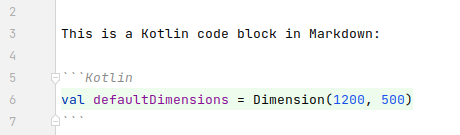
* Fenced code blocks within Markdown files
Injected code is always bound to a specific context that depends on the surrounding code, and the IntelliJ Platform treats injected fragments as separate small files that are in a different language. To ensure highlighting and code-insight features work correctly, these fragments must be a valid statement or expression in the injected language. The three examples from above would then be shown like this in IntelliJ IDEs:
Regex:

SQL:

Markdown:
It's not unusual that injected fragments are distributed among, e.g., several strings that are concatenated like it is common for SQL queries. To solve this, the IntelliJ Platform allows injecting a language into several fragments at once. Multiple parts are then considered belonging together.
A plugin can provide language injection in different ways:
* For simple cases, the bundled [IntelliLang plugin](https://plugins.jetbrains.com/plugin/13374-intellilang) can handle injections, and plugin authors need to provide a configuration with patterns that specify the context where languages should be injected. IntelliLang can also be extended to support unknown custom languages.
* Implementing the [com.intellij.languageInjectionContributor](https://jb.gg/ipe?extensions=com.intellij.languageInjectionContributor) extension point provides a high-level API for the injection of other languages. For more control over how a language is injected, plugin authors use the [com.intellij.languageInjectionPerformer](https://jb.gg/ipe?extensions=com.intellij.languageInjectionPerformer) extension point .
* Implementing the [com.intellij.multiHostInjector](https://jb.gg/ipe?extensions=com.intellij.multiHostInjector) extension point gives plugin authors the most control over where and how language injection will take place.
The following sections discuss these three options in more detail.
## IntelliLang
First, please read the available [documentation](https://www.jetbrains.com/help/idea/language-injections-settings.html) on IntelliLang. A good point to start with is to inspect available language injections in the IntelliLang settings under `Settings | Editor | Language Injections`. The injections shown are configured through XML files and loaded automatically.
### Example
Consider the Java `String.matches()` method that injects the RegExp language into the string of the first argument. In the IntelliLang settings, it is defined as one possible injection in Java code.

Double-clicking on this entry shows the exact context where a RegExp can be injected, and `String.matches()` is one of several possibilities. On the plugin side, these entries are defined in the file [javaInjections.xml](https://github.com/JetBrains/intellij-community/tree/idea/263.7307.200/java/langInjection/resources/resources/javaInjections.xml):
```XML
String (java.lang)
...
```
The XML file with the injection configurations is loaded through the [org.intellij.intelliLang.injectionConfig](https://jb.gg/ipe?extensions=org.intellij.intelliLang.injectionConfig) extension point in file [intellij.java.langInjection.xml](https://github.com/JetBrains/intellij-community/tree/idea/263.7307.200/java/langInjection/resources/intellij.java.langInjection.xml).
```XML
...
```
### Implementation
It is important to make a distinction between plugin authors who want to provide injections into existing languages and plugin authors who want to provide support for IntelliLang injections in their custom language. Both define their injections by providing XML configurations and loading them through the `[plugin.xml](plugin-configuration-file.html)`. However, custom language authors need to implement the [org.intellij.intelliLang.languageSupport](https://jb.gg/ipe?extensions=org.intellij.intelliLang.languageSupport) extension point to make their language and PSI element patterns known to IntelliLang. Therefore, plugin authors who want to provide injections for existing languages can skip the first step.
#### Implement `org.intellij.intelliLang.languageSupport` EP
Implement the [org.intellij.intelliLang.languageSupport](https://jb.gg/ipe?extensions=org.intellij.intelliLang.languageSupport) extension point and use [AbstractLanguageInjectionSupport](https://github.com/JetBrains/intellij-community/tree/idea/263.7307.200/plugins/IntelliLang/src/org/intellij/plugins/intelliLang/inject/AbstractLanguageInjectionSupport.java) as a base class. Please refer to the API docs of [LanguageInjectionSupport](https://github.com/JetBrains/intellij-community/tree/idea/263.7307.200/plugins/IntelliLang/src/org/intellij/plugins/intelliLang/inject/LanguageInjectionSupport.java) for information on methods to override and use [JavaLanguageInjectionSupport](https://github.com/JetBrains/intellij-community/tree/idea/263.7307.200/java/langInjection/src/org/intellij/plugins/intelliLang/inject/java/JavaLanguageInjectionSupport.java) as an example implementation.
#### Create Injection Configuration
Create an XML file with the injection configuration. Export existing injections from the IntelliLang settings to create a template and then edit it. [Element Patterns](element-patterns.html) are used to specify the context where injections will take place. Custom language authors can use the specific patterns returned from their implementation of [JavaLanguageInjectionSupport.getPatternClasses](https://github.com/JetBrains/intellij-community/tree/idea/263.7307.200/java/langInjection/src/org/intellij/plugins/intelliLang/inject/java/JavaLanguageInjectionSupport.java).
The `injection` tag requires the attributes `language` and `injector-id`. The first one specifies the `language-id` (see [Language.getID()](https://github.com/JetBrains/intellij-community/tree/idea/263.7307.200/platform/core-api/src/com/intellij/lang/Language.java)) of the language that is injected. The second one is the id of the host language (see [JavaLanguageInjectionSupport.getId()](https://github.com/JetBrains/intellij-community/tree/idea/263.7307.200/java/langInjection/src/org/intellij/plugins/intelliLang/inject/java/JavaLanguageInjectionSupport.java)). For instance, injecting SQLite into Python code is specified by the following opening tag:
```XML
...
```
Inside an injection, the following tags can be used:
| XML Tag | Description |
| --- | --- |
| `` | A short name for the injection. |
| `` | The element pattern that defines where an injection will take place. The content is wrapped in `![CDATA[...]]`. |
| `` and `` | Static content that is wrapped around the injected code, e.g., to make it a valid expression. For example, to a CSS color specification inside a string, it can be wrapped with the prefix `div { color:` and the suffix `;}` to make it a valid CSS expression. |
| `` | A regex for the content that specifies when this injection should be applied. Regex groups can specify the text range of the injection (e.g. `^javascript:(.+)`, see [xmlInjections-html.xml](https://github.com/JetBrains/intellij-community/tree/idea/263.7307.200/xml/langInjection/resources/resources/xmlInjections-html.xml)). |
| `` | A regex for the content that specifies when this injection should not be applied. |
#### Create an XML File to Load the Configuration
Create an XML file `myLanguageID-injections.xml` next to the `plugin.xml` that loads the above configuration. Custom language authors also register their implementation of the [org.intellij.intelliLang.languageSupport](https://jb.gg/ipe?extensions=org.intellij.intelliLang.languageSupport) extension point there.
```XML
```
#### Load the Injection Configuration in plugin.xml
The injections are an optional dependency that only works when IntelliLang is enabled. Therefore, load the configuration optionally in the main `plugin.xml`:
```XML
org.intellij.intelliLang
```
## `LanguageInjectionContributor` and `LanguageInjectionPerformer`
The [com.intellij.languageInjectionContributor](https://jb.gg/ipe?extensions=com.intellij.languageInjectionContributor) extension point provides injection information for the given context in terms of what to inject. As a plugin author, implement [LanguageInjectionContributor](https://github.com/JetBrains/intellij-community/tree/idea/263.7307.200/platform/core-api/src/com/intellij/lang/injection/general/LanguageInjectionContributor.java) to provide context-specific injections.
For instance, to inject a YAML or JSON to a literal language depending on some conditions, implement this interface like this:
```JAVA
final class MyInjector implements LanguageInjectionContributor {
@Override
public @Nullable Injection getInjection(@NotNull PsiElement context) {
if (!isConfigPlace(context)) return null;
if (shouldInjectYaml(context)) {
return new SimpleInjection(
YAMLLanguage.INSTANCE, "", "", null
);
} else if (shouldInjectJSON(context)) {
return new SimpleInjection(
JsonLanguage.INSTANCE, "", "", null
);
}
return null;
}
}
```
Register the implementation in the `plugin.xml`:
```XML
```
For more control over how the injection should be done, implement the [com.intellij.languageInjectionPerformer](https://jb.gg/ipe?extensions=com.intellij.languageInjectionPerformer) extension point which allows for complex language injections, e.g. for concatenation or interpolation of strings. If it is not implemented, then the [DefaultLanguageInjectionPerformer](https://github.com/JetBrains/intellij-community/tree/idea/263.7307.200/plugins/IntelliLang/src/org/intellij/plugins/intelliLang/inject/DefaultLanguageInjectionPerformer.java) will be used.
For the [com.intellij.languageInjectionPerformer](https://jb.gg/ipe?extensions=com.intellij.languageInjectionPerformer) extension point , two methods need to be implemented in [LanguageInjectionPerformer](https://github.com/JetBrains/intellij-community/tree/idea/263.7307.200/platform/core-api/src/com/intellij/lang/injection/general/LanguageInjectionPerformer.java). First, `isPrimary()` determines if this is the default `LanguageInjectionPerformer` for the language and if it handles most of the injections. If there is no primary `LanguageInjectionPerformer` found, then a fallback injection will be performed.
The method `performInjection()` does the actual injection into the context PSI element and/or some elements around it if needed in case if they are semantically connected (concatenation injection for instance).
> **Note:**
> To use Language Injection API in the project, [add dependency](plugin-dependencies.html#project-setup) on the `org.intellij.intelliLang` plugin.
## `MultiHostInjector`
[MultiHostInjector](https://github.com/JetBrains/intellij-community/tree/idea/263.7307.200/platform/core-api/src/com/intellij/lang/injection/MultiHostInjector.java) registered in [com.intellij.multiHostInjector](https://jb.gg/ipe?extensions=com.intellij.multiHostInjector) extension point is a very low-level API, but it gives plugin authors the most freedom. It performs language injection inside other PSI elements, e.g. inject SQL inside an XML tag text or inject regular expressions into Java string literals.
Plugin authors need to implement `getLanguagesToInject()` to provide a list of places to inject a language, and `elementsToInjectIn()` to return a list of elements to inject.
For example, inject regular expressions into Java string literal:
```JAVA
final class MyRegExpToJavaInjector implements MultiHostInjector {
@Override
public void getLanguagesToInject(@NotNull MultiHostRegistrar registrar,
@NotNull PsiElement context) {
if (context instanceof PsiLiteralExpression && shouldInject(context)) {
registrar
.startInjecting(RegExpLanguage.INSTANCE)
.addPlace(null, null,
(PsiLanguageInjectionHost)context,
innerRangeStrippingQuotes(context))
.doneInjecting();
}
}
@Override
public @NotNull List> elementsToInjectIn() {
return List.of(PsiLiteralExpression.class);
}
}
```
Register the implementation in the `plugin.xml`:
```XML
```
A more complex example is injecting into several fragments at once. For example, consider an XML-based DSL:
```XML
foo
System.out.println(42);
```
which should be converted to the equivalent Java code:
```JAVA
class MyDsl { void foo() { System.out.println(42); } }
```
Here, the plugin needs to inject Java into several places at once, i.e. method name and its body:
```JAVA
final class MyDSLInjector implements MultiHostInjector {
@Override
public void getLanguagesToInject(@NotNull MultiHostRegistrar registrar,
@NotNull PsiElement context) {
if (context instanceof XmlText && isMethodTag(context)) {
registrar.startInjecting(JavaLanguage.INSTANCE);
// construct class header, method header,
// inject method name, append code block start
registrar.addPlace("class MyDsl { void ", "() {",
(PsiLanguageInjectionHost)context,
rangeForMethodName(context));
// inject method body, append closing braces
// to form a valid Java class structure
registrar.addPlace(null, "}}", context, rangeForBody(context));
registrar.doneInjecting();
}
}
@Override
public @NotNull List> elementsToInjectIn() {
return List.of(XmlText.class);
}
}
```
Now, inside the editor the injected portion will work as expected where foo is the method name and `System.out.println(42);` will look and feel like a method body with highlighting, completion, and goto definition working.
## Formatting
To control delegation of formatting to containing file, implement [InjectedFormattingOptionsProvider](https://github.com/JetBrains/intellij-community/tree/idea/263.7307.200/platform/code-style-api/src/com/intellij/formatting/InjectedFormattingOptionsProvider.java) and register in [com.intellij.formatting.injectedOptions](https://jb.gg/ipe?extensions=com.intellij.formatting.injectedOptions) extension point .
## Injection Highlighting
To suppress highlighting from Code | Injected language fragment setting in `Settings | Editor | Color Scheme | General`, injection host must implement [InjectionBackgroundSuppressor](https://github.com/JetBrains/intellij-community/tree/idea/263.7307.200/platform/analysis-impl/src/com/intellij/psi/impl/source/tree/injected/InjectionBackgroundSuppressor.java).